

We have all experienced that moment of frustration: the annual adjustment bill arrives, it shows 180 euros more than expected, and it is impossible to say where it came from. The heating? The water heater? The tumble dryer? A complete mystery.
So you did what many people do: you bought a smart plug with energy monitoring, plugged it into the refrigerator, and discovered that your fridge consumes like a fridge. The investigation stops there. Meanwhile, with a kWh at €0.2001 on the regulated base-rate option (August 2026) and increasingly fine-grained pricing options such as off-peak hours or Tempo, every badly placed kilowatt-hour is paid for in cash.
In this article, we are going to put each tool back in its place. There are three levels for measuring your electricity consumption: the meter, the circuit, and the appliance. A smart plug covers only one of them, and it is not the one where most of your bill is decided. We will see why this is a physical limitation, not a manufacturing defect, and how a module like the Shelly EM Gen4 fills in the missing level, the circuit level.

Transparency: this article was produced in collaboration with Shelly. The explanations, reservations and recommendations remain mine, as always. It also contains affiliate links, at no extra cost to you.
This article starts from the French context, but the reasoning holds on any grid. A few pointers for translation: the Linky is the smart meter rolled out across France, the equivalent of the smart meters deployed throughout much of Europe. Enedis is the distribution network operator, the company that runs the lines and meters across roughly 95% of the country, not to be confused with the supplier that sends you the bill. Off-peak hours (heures creuses) are time slots with a reduced rate, and Tempo is an EDF pricing option where the price per kWh changes according to the color of the day (blue, white, red), red days being deliberately deterrent. Finally, subscribed power here is measured in kVA (6, 9 or 12 kVA in most homes): it is the power ceiling allowed by your subscription.
The three levels of measurement: the total, the circuit, the appliance
Before talking hardware, let us set the frame. In a home, electricity consumption can be observed at three different altitudes. The meter level, first: everything that enters the house, aggregated into a single figure. The circuit level, next: what leaves each row of your electrical panel toward the heating, the water heater, the cooktop or the living-room outlets. The appliance level, finally: exactly what that refrigerator, that router, that PC consumes.
Your meter is the total debited on your bank statement at the end of the month. Per-circuit measurement is the expense categories: groceries, fuel, leisure. The smart plug is the receipt for a single purchase. All three tell the same story, but at three different zoom levels, and none replaces the other two.
The tragedy of most home-automation setups is that they jump straight from the first level to the third. You know the total, you know the fridge, and in between, a great void, precisely where the biggest expense items of the house are hiding.
The Linky meter: the big picture, and nothing else
Let us start at the top. Your Linky meter sees everything that enters the home. It knows your meter index, your instantaneous power, your subscribed power and the current pricing option. All this information is, by the way, accessible in real time, right at your home, thanks to its tele-information output.
The data output of your Linky meter: two small terminals, I1 and I2, located under the lower cover, which continuously broadcast the index, the instantaneous power and the current tariff period to compatible modules.
The same principle exists elsewhere under other names: the P1 port in the Netherlands, Belgium and Luxembourg, the SML optical interface in Germany, the Zigbee Smart Energy profile in the United Kingdom, the United States, Canada and Australia, often with certified hardware and activation by the network operator. The name changes, the idea stays the same: the meter exposes its data locally.
Readers of TIC output exist from several manufacturers, in Zigbee, WiFi or USB, and feed this data into Home Assistant or the app of your choice. Add to that the load curve at 30-minute resolution available via Enedis or your supplier's app, and you get an excellent view of the total.
But the Linky shares a limitation with the bank statement from earlier: it gives you the how much, never the where. A 4 kW spike at 7 p.m., is that the heating, the oven, or both? The meter cannot decide. The curve remains a single curve for the whole house, the sum of everything happening behind it. That is already valuable, but it does not tell you where to act.

The smart plug: surgical, but only at the end of its cord
Now let us go all the way down the scale. Let us be clear: the smart plug with energy monitoring is an excellent tool. On a refrigerator, it reveals a compressor that is wearing out before it fails. On the desk corner or the TV stand, it puts a figure on the real cost of standby devices running 24 hours a day. At the appliance level, nothing does it better, and for about twenty euros.
The problem is not what it measures. It is what it will never be able to see. Take a mental tour of your home and list what is not plugged into any outlet: the electric radiators or the heat pump, the water heater, the oven and the cooktop, the mechanical ventilation (VMC), the lighting in every room, the EV charging point, and so on.
All of this is hardwired: connected directly to the electrical panel, without a single plug in between. And that is no detail. According to ADEME, the French public agency for ecological transition, heating accounts for about 66% of a home's energy consumption, and domestic hot water 11% more. Three quarters of the home's energy therefore flow through lines that no plug will ever cross. This is not a design flaw of this or that brand, it is physics: a plug measures what flows through it, full stop.
“By fitting my home with smart plugs, I will finally know where my electricity goes.”
The bulk of the bill (heating, hot water, cooking, ventilation, lighting) runs through hardwired circuits, invisible to any smart plug, whatever its brand.

The Shelly EM Gen4: measurement comes down to the circuit level
This is where the intermediate level comes in, the one almost nobody equips even though it concentrates most of what is at stake. The Shelly EM Gen4 is an energy meter that installs in the electrical panel, or in a nearby junction box, and measures current using current clamps: rings that clip around a conductor, without cutting or stripping anything. The clamp reads the magnetic field generated by the current flowing through the cable, a so-called contactless measurement.

Two clamps, two stories to tell
The module handles two independent measurement channels in single-phase installations. In concrete terms, that opens several scenarios: one clamp on the main feed and one on the water heater, one on the heating and one on the cooktop, or even one on consumption and one on the output of your solar panels. A 50 A clamp is included in the box; the second is sold separately, and 80 A and 120 A models exist for the heaviest circuits.
The included clamp handles up to 50 A, or about 11.5 kW at 230 V: perfect for a dedicated circuit or for the main feed of a 6 or 9 kVA subscription. To measure the main feed of a 12 kVA subscription, choose an 80 A or 120 A clamp instead, otherwise the measurement risks saturating under full load.

The dry contact: the small output that drives your water heater
The module also includes a dry contact output, limited to 2 A. Only two amps? Yes, and that is deliberate: this output powers nothing directly; it drives a contactor, that big panel relay that itself switches the water heater's amps. It is exactly the principle of the day/night contactor many of you already have (a power relay slaved to the meter's off-peak signal), with home automation on top.
And the topic is timely. Since November 2025, Enedis, the French distribution network operator, has been gradually shifting off-peak hour time slots, eventually with a minimum of 5 consecutive hours at night and up to 3 hours in the afternoon, between 11 a.m. and 5 p.m., in the summer period, to absorb solar production. The classic contactor slaved to the meter will follow these new slots, that is not the issue. The value of home-automation control is the flexibility beyond that: blocking heating on red Tempo days, forcing it before guests arrive, slaving it to your solar production rather than to the clock. All while checking the real effect on consumption, since the clamp is already in place at the same spot.
The wiring, in concrete terms
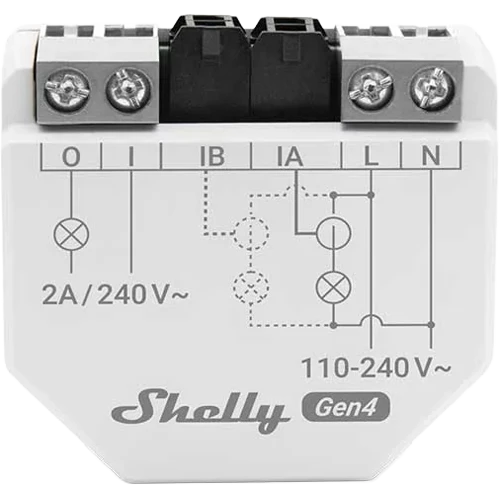
What does the connection actually look like? The module has six terminals, and each has a precise role. What follows summarizes the official documentation, which remains the reference in case of doubt.
- L and N: the module's power supply, live and neutral, at 110 to 240 V. Shelly requires this circuit to be protected by a 2 A maximum circuit breaker, B or C curve.
- IA and IB: the inputs for the two clamps, CTA on IA and CTB on IB. Each clamp closes around a single conductor, the live wire of the circuit to be measured. Never the live and neutral together: the two currents cancel out and you will read zero.
- I and O: the dry contact, potential-free and limited to 2 A at 240 V, which switches your contactor's control circuit.
Two details save a huge amount of time. The orientation, first: each clamp carries a K → L marking, K on the source side, L on the load side. Fitted backwards, it will show negative power; you simply flip it, or enable the inversion (reverse) option provided by the firmware. The clamp type, next: it must be declared in the interface, as 50, 80 or 120 A. Without this setting, the module reports an error and the measurement is worthless. For the rest, the terminal block accepts 0.5 to 4 mm² wire, stripped to 6 to 7 mm, tightened to 0.4 Nm.
And if you would rather see the assembly than read about it, Shelly has produced a genuinely well-made 3D installation video that shows every step from every angle.
Local first: your data stays at home
On the data side, this Gen4 ticks the boxes you would expect in 2026. The module stores at least 30 days of history at one-minute resolution directly in internal memory, viewable from its embedded web interface and exportable to CSV. Nothing forces you through the cloud: everything works locally, with native integration into Home Assistant, and the Shelly cloud remains available for those who prefer the in-house app. Connectivity keeps up with its era with WiFi 6, Bluetooth, Zigbee and Matter certification. The full datasheet is available on Shelly's website.
| Measurement channels | 2, single-phase |
| Compatible clamps | 50 A (one included), 80 A, 120 A |
| Measurement range | 0 to 120 A, rated accuracy ±2% from 1 to 50 A, ±5% below 1 A |
| Detection threshold | 30 VA (below that, nothing is counted) |
| Measured quantities | Active and apparent power, energy, voltage, power factor |
| Dry contact | 1 output, 2 A max, for driving a contactor |
| Onboard history | 30 days minimum at 1-minute resolution, CSV export |
| Connectivity | WiFi 6, Bluetooth, Zigbee, Matter |
| Interface | Embedded web, Shelly app, Home Assistant integration |
| Power supply | 110 to 240 V AC, consumption under 1 W |
| Required upstream protection | 2 A maximum circuit breaker, B or C curve |
| Dimensions | 37 x 42 x 16 mm |
| Observed price | Approximately €67, around €60 on promotion (July 2026) |
To be thorough: Shelly obviously does not have a monopoly on per-circuit measurement. Equivalent solutions exist from other manufacturers, such as Schneider's PowerTag sensors that clip directly onto the circuit breakers, and for three-phase installations, Shelly itself offers the Pro 3EM. The logic is identical everywhere: clamps on the circuits, data circuit by circuit. Simply put, at around 67 euros list price, about sixty euros from French retailers at the time of writing (July 2026), with onboard history, the dry contact and 100% local operation, the EM Gen4 offers a very solid feature-to-price ratio in this category.
Safety considerations: the panel does not forgive improvisation
It has to be said plainly, and it is the trade-off for everything above: installing this module means opening the electrical panel. The clamps clip on without touching the copper, true, but the module itself must be powered on live and neutral, and the dry contact connects to the contactor's circuit. You are therefore working among 230 V terminals. Shelly says nothing different: its manual reserves installation to a qualified electrician according to national regulations.
No work in the panel is ever done live, not even “just to clip on a clamp”. 230 V leaves no second chance.
- Switch off the main breaker, not just the breaker for the circuit concerned
- Verify the absence of voltage with a multimeter or a voltage-absence tester before touching anything
- Restore power only once the wiring has been checked and the covers are closed
And let us be honest all the way: if the previous paragraph made you uncomfortable, that is a signal worth listening to. Call an electrician. The installation is quick for a professional, and your physical integrity has no price-performance ratio. There is no shame in delegating the wiring to keep the pleasure of the software configuration, which remains entirely in your hands.

The combined strategy: the right tool at the right level
By now you have understood, the question is not about picking a side. The three levels complement each other, and a well-designed measurement setup uses them all, each for what it does best.
The meter tells you how much. The circuit tells you where. The plug tells you what.
Concretely, here is the order I recommend for equipping a home:
- The total: your Linky already provides it, via your supplier's app, the Enedis load curve or a TIC reader integrated into your home automation.
- The heavy circuits: a Shelly EM Gen4 with one clamp on the main feed and one on the biggest item, water heater or heating first. That is where most of the bill is hiding.
- The remaining mysteries: a few smart plugs on the usual suspects, the old freezer in the basement, the desk corner, the TV stand.
A deliberately simple example, with the regulated tariffs in force in August 2026, i.e. €0.2142 per kWh in peak hours and €0.1589 in off-peak hours. Take a water heater drawing 2,400 W for 3 hours a day, or 7.2 kWh. If that heating still happens in peak hours, for lack of a contactor or because a forced-on override has been stuck for months without anyone noticing, moving it to off-peak hours represents about €0.35 per day, or nearly 145 euros per year. And if your day/night contactor is already doing its job correctly? That is exactly what the clamp will confirm to you, in black and white, from the very first night. The gain will then have to be found elsewhere: for Tempo subscribers, by blocking heating on red days, when the kWh climbs to €0.7295 in peak hours versus €0.1615 at night. A single badly placed heating cycle on a red day is 4 euros gone up in smoke, and nearly 90 euros over the 22 red days of winter. Or by timing the heating to your solar production.
Describe your setup on the forum, the community will help you choose where to place your clamps.
Conclusion: the plug was not the problem, the level was
Let us return to the question in the title. What a smart plug will never be able to measure is everything that does not flow through it: the heating, the hot water, the cooking, the ventilation, the lighting. In other words, the bulk of your bill. That is no manufacturer's fault, it is the very definition of the object.
My recommendation is therefore crystal clear. If you finally want to understand where your money goes, start at the circuit level: a Shelly EM Gen4 with one clamp on the main feed and one on the water heater or the heating will teach you more in a week than years of meter readings. Keep the smart plugs for what they do better than anyone, examining one specific appliance. And if opening the panel puts you off, delegate the installation to an electrician rather than giving up on the data.
Comments 0